ADV Home
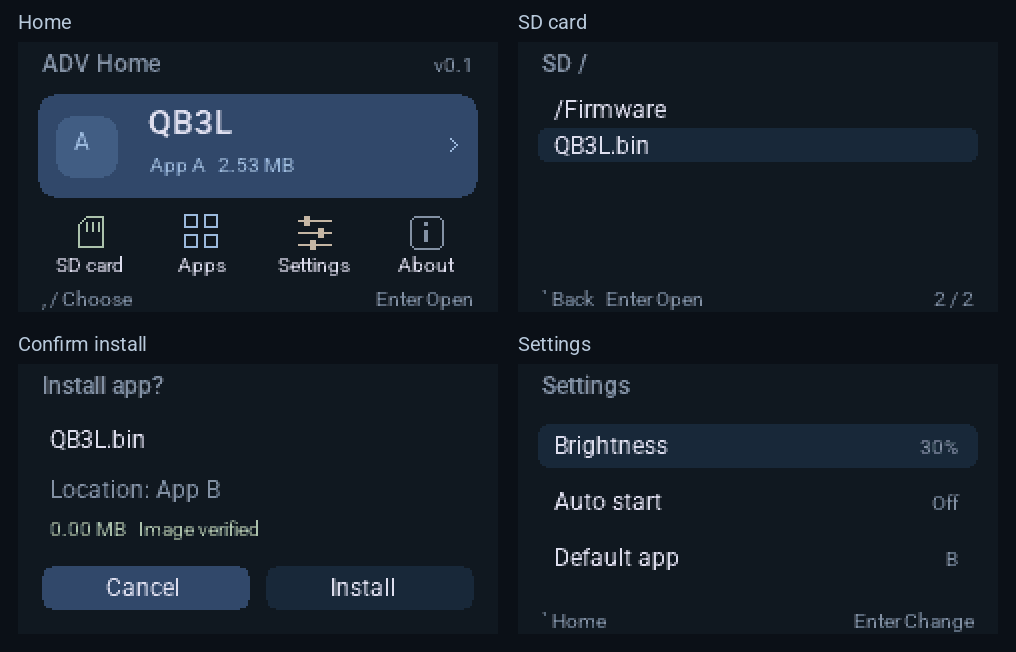
A lightweight launcher for Cardputer ADV. Install firmware from a microSD card, choose between two app slots and optionally start your preferred app automatically.
v0.1 preview · Hardware testing pending
Cardputer ADV · ESP32-S3 · 8 MB Flash · English device interface
Choose the installation for your device
The device displays v0.1; the release tag is v0.1.0. The two images use different addresses. Check your current launcher and partition layout before choosing.
The release bundle includes both images, installation instructions and license materials. When sharing a standalone binary, include the matching third-party notices archive. Third-party notices ZIP
Install, choose and start from the device
Install from microSD
Browse card folders and select compatible firmware. Check image format, target chip and integrity before writing, then verify it by reading it back.
Two app slots
Slots A and B each provide 3 MiB. Run, replace or remove an app, while leaving the other slot intact.
Optional automatic startup
Choose a default app and brightness, with an optional three-second countdown. Press any key to stay in Home; abnormal resets skip automatic startup.
Try a complete workflow after installing Home
First flash Home using the installation guide, then use an application image within the supported scope.
Prepare the card
Copy a compatible .bin app to a FAT32 card. Eject it safely and insert it while the device is powered off.
Choose a slot and install
Open SD card, choose the file and App A or B. Switch from Cancel to Install, press Enter and keep power connected until it finishes.
Run and set the default
Choose the slot in Apps and run it. A successful installation makes that slot the default. Adjust the default app and Auto start in Settings when needed.
Navigate with comma / slash for left / right and semicolon / period for up / down, without Fn. Enter confirms; backtick or Backspace goes back.
What has been validated
The v0.1 release notes report passing ESP-IDF builds, host tests and image checks. Hardware testing for this release is pending. An earlier N1.1 installation was reported on one Cardputer ADV; this does not establish hardware validation for v0.1.
Further validation needs more devices, microSD cards, third-party applications and interrupted-power scenarios.
Read the release and validation notesCompatibility and scope
Currently targets Cardputer ADV. Each app is limited to 3 MiB; firmware requiring a dedicated filesystem or another partition layout may be incompatible. Image checks verify format and integrity, not publisher identity or application behavior.
The device interface is English. This release has no online catalog, web uploads, Bluetooth or Chinese fonts.
Questions and feedback
Can I use the original Cardputer?
This release targets Cardputer ADV with ESP32-S3 and 8 MB Flash. The original Cardputer and other boards have not been validated.
Can either slot run any firmware?
Each application must fit within 3 MiB and provide a standard ESP32-S3 application image and descriptor. Single-app merged images without dedicated filesystem partitions can be extracted. FAT, SPIFFS, LittleFS or other partition requirements may be incompatible. Passing image checks does not guarantee that an app runs.
How do I return to Home from an app?
Press RST. If automatic startup is enabled, press any key during the three-second countdown to stay in Home. Home’s Back key cannot exit a running application. Automatic startup is skipped after an abnormal reset.
Why did the default app change after installation?
A successful installation makes that slot the default app. To keep starting App A, select A again in Settings after installing App B.
Can I return to another launcher?
Follow the other project’s instructions to flash a full image intended for Cardputer ADV. Back up what you need first; apps and settings may need to be installed again.
Reviewed and updated: November 7, 2026