Decision Review
Record why you chose something, revisit what happened and keep a lesson for next time. Compare reasons with outcomes in Obsidian, with correction history and independent lesson notes.
Decision Review · 0.1.6 desktop preview
Manual installation · Obsidian 1.8.7+ desktop · English / 简体中文
Get started in Obsidian on desktop
- Download and extract the installation ZIP.
- Copy its
decision-reviewfolder into your vault’s.obsidian/plugins/. - Check that the folder directly contains
main.js,manifest.jsonandstyles.css, then fully reload Obsidian. - Enable Decision Review in Settings → Community plugins. Click the ribbon book icon or run the Open Decision Review command.
This preview is installed manually through GitHub and has not been submitted to the Obsidian community plugin directory. Allow community plugins if Restricted Mode is enabled.
Try one complete workflow
Follow this sample workflow, or substitute your own course, project or decision.
Record a concrete decision
Try “Build a small project before buying an advanced course.” Record why, what you expect and when to review it.
Return to the actual outcome
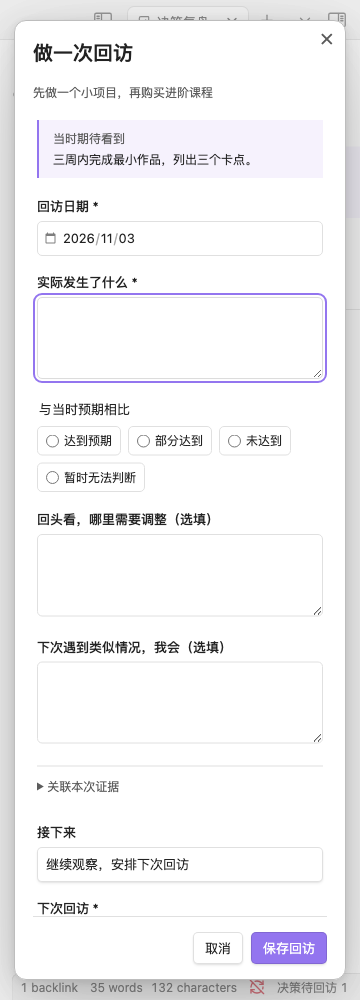
Open it from Due reviews or All decisions. Record what happened, how it met expectations and what follows.
Keep a lesson for next time
Choose “Save as lesson note” and write what to do next time. The independent vault note keeps a link to its source.
Just exploring? Load the demo in plugin settings. Demo and real records are stored separately; switch back before recording your own decisions.
Connect the original reasoning to what happened
For revisiting learning, creative and project choices. Capture your reasoning, then examine it against experience.
Capture reasons and expectations
Record the decision, main reason and expected outcome. Add alternatives, assumptions, vault files and links when useful.
Revisit and compare
Open the due-review queue and compare reasoning with outcomes. Choose how expectations were met, then keep observing, reschedule or close follow-up.
Keep corrections and lessons
Keep the original and the reason for each correction. Reviews retain their reference version. Save a practical next step as an independent Markdown lesson note.
Inside the plugin
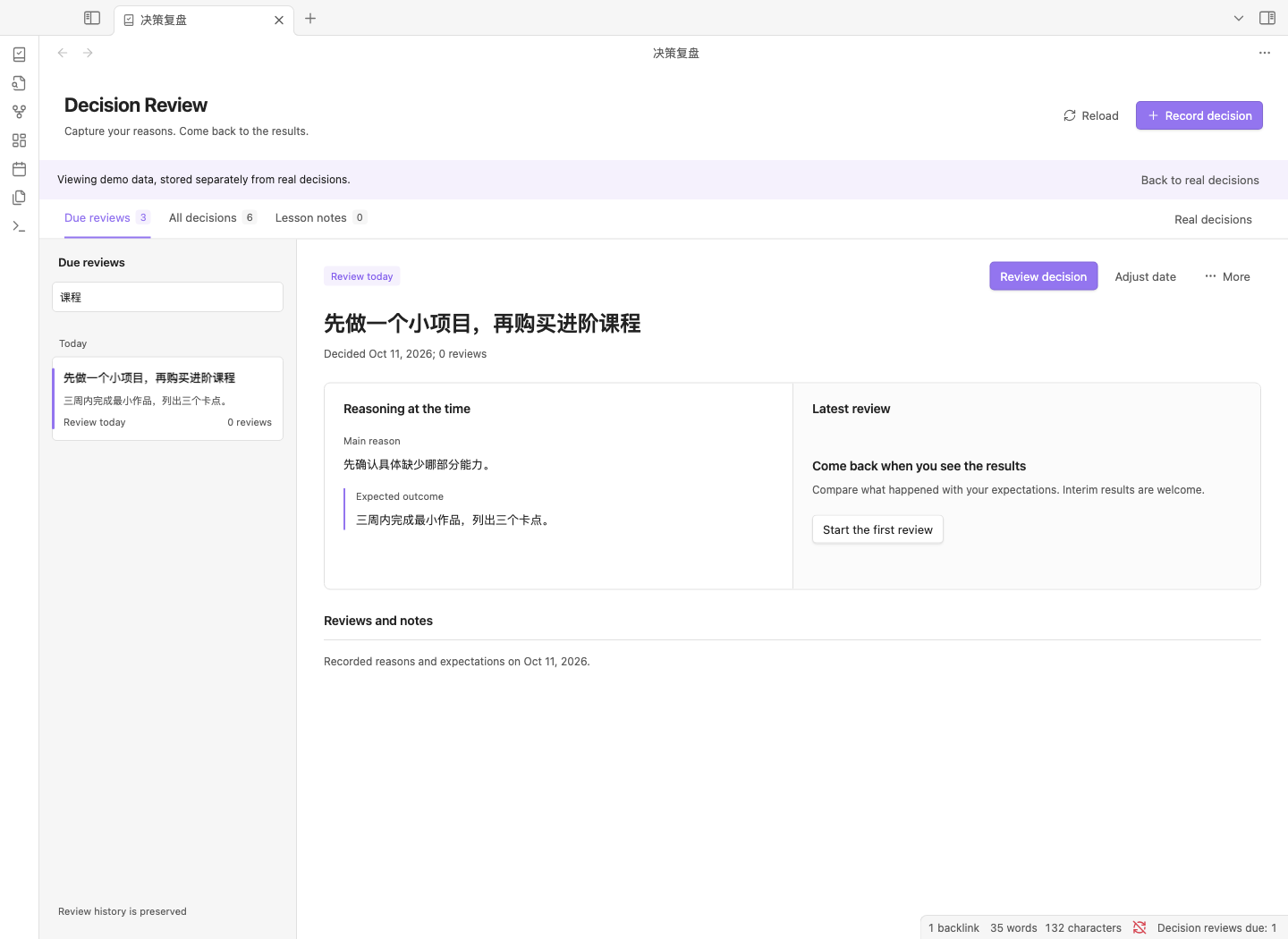
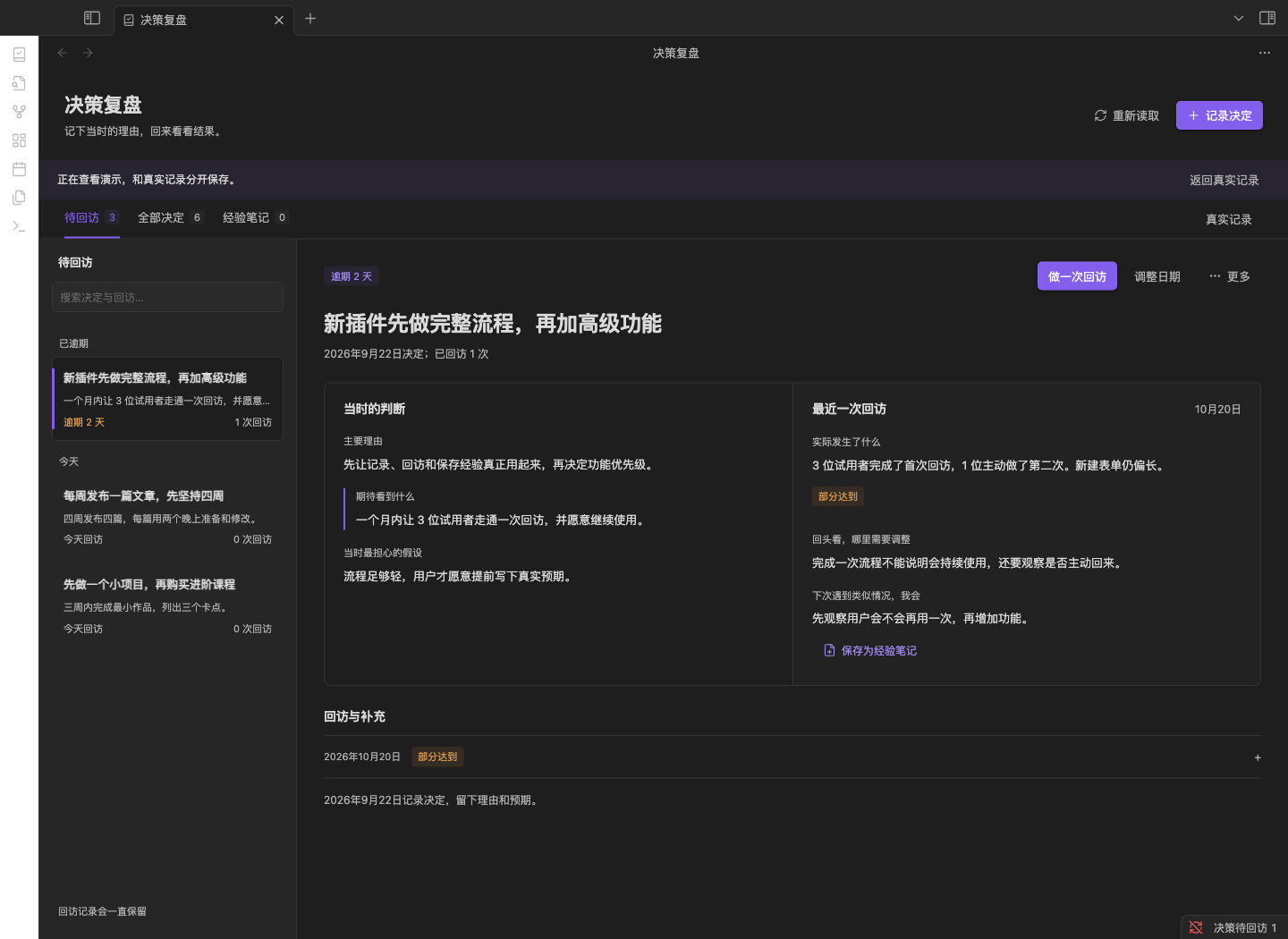
Original Obsidian screenshots from the repository, using demo records. The narrow pane is a desktop layout.
Reasoning and reviews side by side
Turn a review into a next step
Records stay in your vault
Each decision is a Markdown file; lesson notes are saved separately. No account, network service or AI provider is required. URLs open only when clicked. Files remain readable after uninstalling.
Demo and real records are stored separately. Saving checks for intervening file changes to prevent stale overwrites. Resolve sync conflicts before editing the same record on multiple devices.
Current release scope
Desktop only. Tested on macOS with Obsidian 1.8.7; Windows, Linux and newer host versions have not completed native acceptance testing.
Review reminders appear inside the plugin and optional status bar. This version does not provide system notifications, AI advice, automatic summaries, probability calibration or multi-option scoring.
Help while you try it
Can I use it on mobile?
This release supports Obsidian 1.8.7+ on desktop only. You can read this site on a phone; install and use the plugin on a computer.
Why does the plugin not appear after extracting it?
Check for an extra nested folder: main.js, manifest.json and styles.css must sit directly inside the plugin folder. Reload Obsidian and enable it in Community plugins.
What happens to my records when I update or uninstall?
Copy unsaved input before updating, replace the three runtime files and fully reload Obsidian. Existing records need no migration. Decision and lesson files remain readable after uninstalling.
Do these plugins exchange data automatically?
The three plugins are installed separately and keep their own records: investments and outcomes, project next steps, and decisions with reviews. They can link to the same note, but do not automatically exchange data.
Reviewed and updated: November 4, 2026